Blog / Records & sales
How Cemetery Plots Get Sold Twice, and How to Stop It
Selling the same grave twice is the most painful mistake a cemetery can make, and it is almost never fraud. It is usually two records that were never connected. Here is how it happens and the controls that stop it.
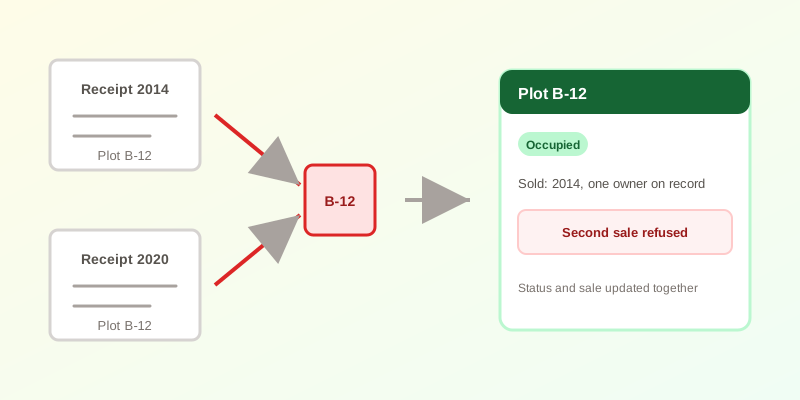
What it looks like when it happens
The cases that reach the news follow the same shape: a family buys a plot, years pass, and the mistake surfaces at the worst possible moment, when someone is already buried there or a burial is about to be scheduled.
- Normalville Cemetery, Pennsylvania. As WPXI reported in 2022, a couple bought two plots next to their son in December 2020. About a year later they found someone else buried in one of them. The cemetery's director said the plot was “open” in his records. According to the family's attorney, the neighbouring family agreed to give up their plots, and the district attorney's office was looking at whether the cemetery had sold plots twice before.
- McHenry County Memorial Park, Illinois. A 2019 lawsuit reported by Shaw Local alleges a plot was sold to a mother for her son on October 22, 2014, after it had already been sold to another family, and that he was buried there three days later. The cemetery raised it in April 2019 when it planned a burial next door. The suit alleges the cemetery failed to keep adequate sales records. These are allegations in a lawsuit, not findings.
The Pennsylvania Attorney General's office told WPXI it had received five complaints about plots sold more than once since 2018, and three about people buried in the wrong plot. That is only the complaints that reached one state office.
Why it happens: two records that never meet
In both cases above, the failure was the same: what the cemetery believed about the plot was not what had been sold. That gap usually opens in one of five ways:
- The sale and the map live apart. A receipt or deed is written, but nobody marks the plot as taken on the map or register.
- Holds are informal. A family says “we'll take it,” the plot is pencilled in on a sheet, and the next person in the office never sees the pencil mark.
- Pre-need purchases fall through the cracks. A plot paid for in 2009 and used in 2031 has to stay reserved for 22 years of staff turnover.
- Legacy records disagree. A paper ledger, a card file and a spreadsheet each hold part of the story, and nobody knows which one wins.
- More than one person sells. Two staff members, a sales agent or a volunteer each work from a different copy of the truth.
Controls that close the gap
- One status per plot, in one place. Every plot is available, on hold, reserved, occupied or unavailable, and that status is the only answer to “can we sell this?”
- Make the sale update the status. Recording a sale and changing the plot should be one action, not two chores. Anything that relies on remembering the second step will eventually be missed.
- Distinguish “chosen” from “paid for.” A hold protects a plot while a family decides. A reservation means money has changed hands. Treating them as different states keeps both visible.
- Check before you dig. Before a burial, confirm the plot's status, who it was sold to and how many interments it already holds, and match the plot to the ground, not only to the paper.
- Keep a trail. When a sale is created or changed, record who did it and when. If a dispute comes, you can reconstruct what the office knew at the time.
- Audit the old records once. Reconcile the ledger, card file and spreadsheet against the physical cemetery before you trust any of them.
What the software can and cannot do
Software cannot walk the grounds for you, and no system replaces checking the marker before a grave is opened. What it can do is remove the failure that depends on someone remembering a second step.
In CEMETERRA, recording a plot sale updates the plot's status in the same step, and the sale is refused if any selected plot is not available or on hold. Pre-need sales move a plot to on hold, then to reserved once payment is received. Each plot carries its own interment limit, and sale creation and changes are written to the audit log. The public plot storefront lists only available plots.
A short checklist for this week
- Pick the single place where plot status is recorded, and retire the others for status purposes.
- List every plot with a sale, hold or pre-need contract and confirm its status matches.
- Add a pre-burial check: status, owner and interment count, matched to the physical plot.
- Decide who is allowed to sell, and make sure they all use the same record.
CEMETERRA ties plot sales, holds and pre-need contracts to the map in one record. See the full feature list or pricing for what is included at each tier.
If your records are still on paper, read how to digitise burial records first, or create a free account and try it on your own map.